
Download Coursable – Personalized AI Study Guide for Windows, Mac, Android & iOS
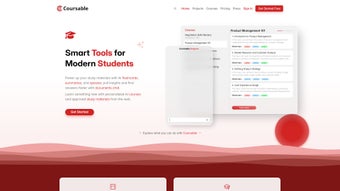
Coursable is a revolutionary AI-powered study guide tool that transforms how learners approach new subjects. Designed for students, professionals, and lifelong learners, Coursable generates customized, step-by-step learning paths by analyzing your goals and preferences. Whether you're diving into machine learning, mastering digital marketing, or exploring philosophy, Coursable curates high-quality, vetted resources from trusted online platforms like Coursera, Khan Academy, and edX.
With a simple input of your desired topic, the AI creates a personalized course, complete with learning milestones, recommended videos, readings, and practice exercises. This makes it one of the most effective free AI learning tools available today. The platform supports self-paced learning, progress tracking, and even allows you to export your course as a PDF for offline access.
Coursable is not just a study app—it’s your intelligent learning companion, helping you stay focused, motivated, and on track. Whether you're preparing for certification exams, upskilling for a new job, or simply expanding your knowledge, Coursable delivers a seamless, secure, and user-friendly experience across all major devices.
Why Coursable Stands Out: Key Features
What sets Coursable apart from generic learning apps is its intelligent, adaptive approach to education. At its core, Coursable leverages advanced AI algorithms to analyze vast repositories of educational content and deliver a tailored learning experience. One of the standout features is its personalized course generation. Simply type in your topic—say, “Python for Data Science”—and Coursable instantly constructs a structured curriculum with clear learning objectives, recommended resources, and a logical progression from beginner to intermediate levels. This eliminates the guesswork and saves hours of research.
Another powerful feature is resource curation from trusted platforms. Unlike many AI tools that recommend random websites, Coursable only pulls from high-quality, peer-reviewed, and accredited sources. This ensures that every video, article, or quiz you encounter is reliable and educationally sound. The app also supports progress tracking, allowing you to mark completed lessons, set reminders, and visualize your learning journey through interactive dashboards. You can even adjust the course structure—adding, removing, or reordering modules—giving you full control over your study plan.
For those who prefer offline access, Coursable offers PDF export functionality, making it easy to share your course with peers or print it for physical study. The tool also supports multi-device sync, so you can start learning on your laptop and continue on your tablet or smartphone without missing a beat. Whether you're using Windows, Mac, Android, or iOS, Coursable ensures a consistent, responsive experience. With regular updates and a growing library of topics, Coursable continues to evolve, making it a long-term investment in your personal and professional development.
How to Install and Use Coursable on Your Device
Getting started with Coursable is quick, simple, and entirely free. The first step is to download the app from the official website or your device’s app store. For users on Windows and Mac, visit the Coursable homepage and click the “Download” button to get the desktop version.
The installer is lightweight and installs in under a minute. Once installed, open the app and sign in with your email or Google account. The onboarding process is intuitive, guiding you through your learning goals and preferred pace.
After setup, navigate to the “Create Course” section. Here, enter your desired topic—like “Web Development with React” or “Introduction to Psychology.” Coursable’s AI will instantly generate a detailed course outline with modules, estimated study time, and recommended materials. You can then customize the course by adjusting the difficulty level, adding personal notes, or skipping sections you’re already familiar with. The app also lets you set weekly study goals and receive gentle reminders to stay on track.
As you progress, use the built-in tracker to mark lessons as completed. Each module includes direct links to the original resources, so you never leave the app to search for materials. For added flexibility, you can export your entire course as a PDF and share it with classmates or mentors.
The mobile apps for Android and iOS offer the same functionality, with a touch-optimized interface that makes studying on the go seamless. Whether you're commuting, taking a break, or studying in a quiet café, Coursable adapts to your lifestyle. With regular updates and a growing knowledge base, the tool continues to improve, ensuring a future-proof learning experience.
Compatibility & System Requirements
Coursable is designed for maximum accessibility, supporting a wide range of operating systems and devices. Whether you're a Windows user, Mac enthusiast, Android smartphone owner, or iOS device holder, you’ll find a version of Coursable that fits your workflow. The desktop versions for Windows 10/11 and macOS 10.14 or later are available for free download from the official site. These apps are lightweight, require minimal storage, and run smoothly even on older machines.
For mobile users, Coursable offers native apps for both Android (version 8.0 and above) and iOS (version 13 and later). These apps are optimized for touchscreens, with intuitive navigation, offline mode support, and push notifications to keep you engaged. The mobile experience is just as powerful as the desktop version, allowing you to create, edit, and track your courses from anywhere. All versions sync in real time via the cloud, so your progress is always up to date.
Additionally, Coursable supports web access through any modern browser—Chrome, Firefox, Safari, or Edge—making it ideal for users who prefer not to install software. The web version is fully responsive and includes all core features, including course creation, progress tracking, and PDF export. With no need for complex setup or technical knowledge, Coursable ensures that learners of all skill levels can get started quickly. The platform is secure, with end-to-end encryption for user data and compliance with GDPR and CCPA standards. Whether you're learning at home, in the office, or on the move, Coursable is ready to support your journey.
Pros and Cons of Coursable
- Pros:
- AI-powered course generation saves hours of research
- Curated from trusted, high-quality educational sources
- Full customization—adjust pace, modules, and structure
- Progress tracking with visual dashboards and reminders
- PDF export for offline access and sharing
- Available on Windows, Mac, Android, iOS, and web
- Free to use with no hidden costs
- Secure, GDPR-compliant, and privacy-focused
- Cons:
- Some advanced features are limited in the free version
- Dependent on external platforms for content delivery
- AI suggestions may occasionally miss niche topics
- Requires internet connection for full functionality
- Mobile app could benefit from more offline capabilities
Frequently Asked Questions (FAQ)
-
Is Coursable completely free to use?
Yes, Coursable offers a fully free version with core features like course creation, progress tracking, and PDF export. While premium upgrades are available, the free tier is robust enough for most learners.
-
Can I use Coursable offline?
You can access your course content offline after downloading it via the mobile app or exporting it as a PDF. However, real-time sync and full AI features require an internet connection.
-
What topics does Coursable cover?
Coursable supports a wide range of topics—from programming and business to psychology and creative arts. The AI continuously expands its knowledge base, so new subjects are added regularly.
-
How does Coursable ensure the quality of its resources?
Coursable only integrates with reputable platforms like Coursera, edX, Khan Academy, and MIT OpenCourseWare. All recommended materials are vetted for accuracy, relevance, and educational value.
-
Can I share my Coursable course with others?
Absolutely. You can export your course as a PDF and share it via email, messaging apps, or print it for physical study. This makes it ideal for group learning or mentorship.
Final Verdict: Is Coursable Worth Downloading?
Coursable isn’t just another study app—it’s a game-changer for anyone serious about learning. With its AI-driven personalization, trusted content, and seamless cross-device experience, it delivers on its promise to make learning efficient, enjoyable, and accessible. Whether you're a high school student preparing for exams, a professional upskilling for a new role, or a curious mind exploring a new hobby, Coursable adapts to your needs.
The free version is feature-rich, secure, and easy to use, making it one of the best free AI study tools on the market today. While minor limitations exist—such as internet dependency and occasional niche topic gaps—these are outweighed by the tool’s strengths. With regular updates and a growing community of learners, Coursable is poised to become a staple in modern education.
Ready to start your next learning journey? Download Coursable today and turn your curiosity into expertise—fast, smart, and stress-free.



.png)



